Make your first calculation
Find the customer’s home, trace the roof, enter a year of usage, choose the equipment and the price, then press Calculate and Save PDF. A simple roof takes about five minutes.
Every calculation is one home and one proposal. Cali-Graf saves your work as you go, so you can stop and come back to it from Calculations at any time.
Before you start
- The customer’s address. Cali-Graf calculates bills for homes served by LADWP and SCE.
- A year of electric bills — or at least the total kWh the home used last year.
- Your price in dollars per watt, and the price of a battery if you’re adding one.
Step by step
Start a new calculation
In Calculations, press New calculation. The calculator opens on the Roof section.
Find the home
Type the address in Customer address, pick it from the list and press Find. Cali-Graf finds the utility, its rate zone and the date of the aerial photo — the calculation uses all three. Check that the pin sits on the right roof.
Trace the roof and place the panels
Press Design roof ↗. The roof editor opens in a new tab. Pick Roof (P) and click the corners of each roof face. Cali-Graf measures the pitch and direction of every face from Google’s 3D height data — see Roof pitch: measured or set by hand.
Then pick Panels (N), choose the panel and press Fill roof (X). Panels go on every face except north-facing ones, around fire setbacks and obstacles. Press Done to go back to the calculator.
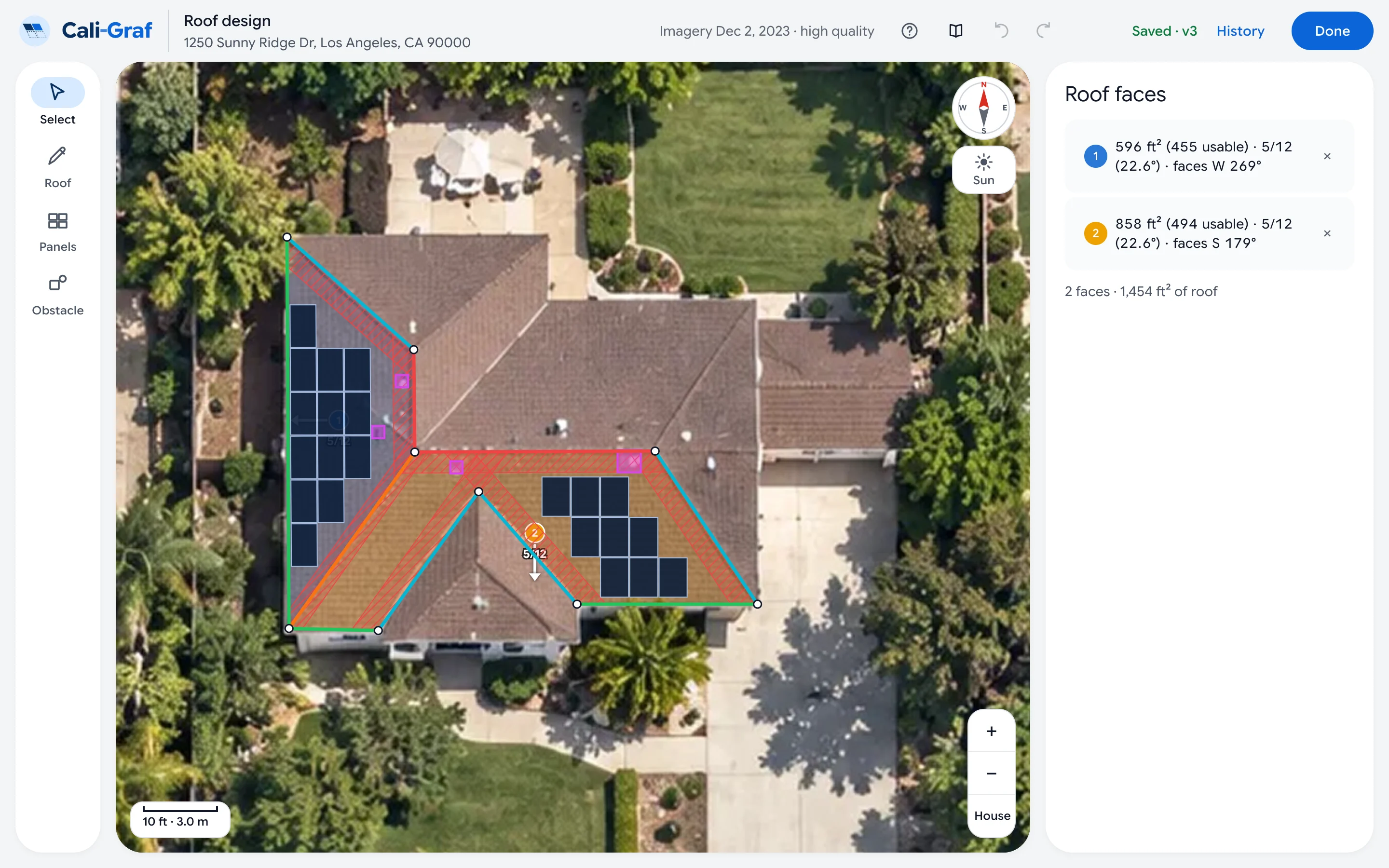
The roof editor: faces traced on the aerial image, panels placed around the red fire setbacks. Imagery © Google. Enter the usage
Open Usage and pick how you enter it:
BillsMost accurate
6 bills for LADWP (every 2 months) or 12 monthly bills for SCE.
Yearly total
Just the kWh the home used in the last 12 months.
Green Button
The file with the home’s hourly usage from the utility’s website.
Choose the inverter and, if needed, a battery
The panel comes from the roof editor. In Inverter, pick the exact model — the proposal lists exact equipment. To add a battery, open Battery, pick the model, the number of units and the operating mode. A green mark means the panel, inverter and battery work together.
Set the price
In Price & settings, enter the Solar price per watt, the Battery price and any Extras such as a main panel upgrade. Choose how the customer pays and type the Customer name for the proposal cover.
Calculate
Press Calculate. Cali-Graf models production hour by hour and applies the utility’s rates and net metering rules. The first run for a new home takes up to half a minute while Google shade data downloads.
The result shows the savings per year and per month, the electric bill today and with solar, how much of the home’s usage the panels cover, and the system cost and payback.
Make the proposal
Press Save PDF. The proposal downloads in about half a minute — see Create the proposal PDF — and what it needs first.
Try it on a demo home
Not ready with a real customer? Press the tutorial button in Cali-Graf. The tour walks you through the same steps on a demo home and moves on when you press the highlighted buttons.
Was this helpful?
Thanks — it helps us make this page better.
Updated